Introduction #
sing-box VT is a versatile proxy client designed for iPhone users. It also supports Mac, iPad and Apple TV, offering a full set of features for creating and managing network proxy servers.
Released on the Apple platform on September 18, 2024, sing-box VT is one of the few completely free proxy apps available on iOS. With a size of just over 20 MB, it is extremely lightweight and has gained popularity quickly since launch. The app allows users to easily set up client and transparent proxy modes to meet various network needs.
Compared with paid alternatives such as Shadowrocket (about $3) and Stash (about $4), sing-box VT is free, similar to V2Box. Its design focuses on speed and high customizability, making it suitable for both beginners and advanced users.
In addition, sing-box VT supports managing local, iCloud and remote sing-box configuration files, providing excellent flexibility and convenience. Platform-specific optimizations further enhance usability across different devices. With its free license, it is an accessible choice for anyone who wants to optimize network settings without paying extra.
Download Links #
- Download sing-box VT from the App Store
- Note: The app is currently unavailable in the China App Store. A US or other non-China region Apple ID is required.
Download with a Free Shared Apple ID #
- Sign out of your current Apple ID and sign in with one of the shared IDs below.
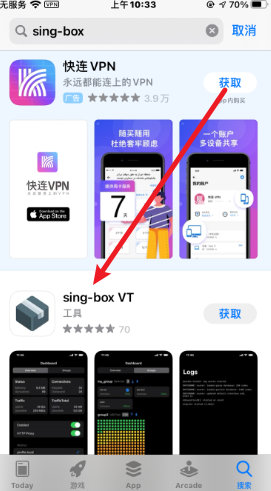
- Search for sing-box or sing-box VT.
- Tap Get and install the app.
Shared IDs last updated: August 22, 2026
| Account | Password |
|---|---|
| [email protected] | NRAWwfwD2K |
| [email protected] | S48cQPJecF |
| [email protected] | Dd10096da |
| [email protected] | TzTx3!zd |
If the IDs above no longer work, you can purchase a temporary US Apple ID (around 7 RMB) from:
How to Use #
1. Open the App #
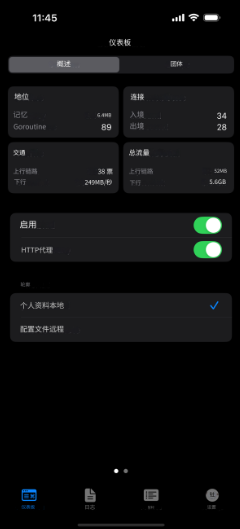
After installation, launch sing-box VT. The main interface looks like this:
2. Import a Subscription #
Tap the third button at the bottom (Profiles / Config), then import a subscription by scanning a QR code or pasting a link:

3. Get a Subscription Link (Example: Wangji Kuaiche) #
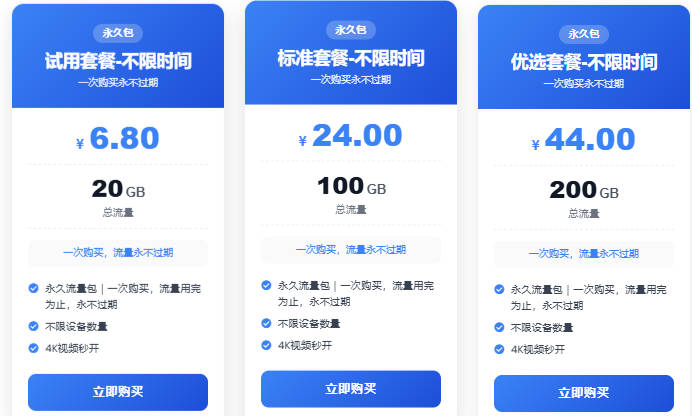
We recommend the Wangji Kuaiche (Intercontinental Express) service: unlimited time, pay only for traffic, excellent value.
- Register at Wangji Kuaiche
- Go to the Store, choose a suitable plan and complete the purchase.
- After purchase, tap “Usage Tutorial” → “Universal Subscription” → “Copy Subscription Address”.
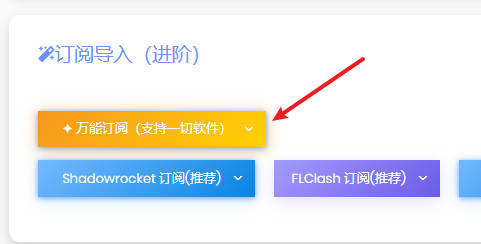
- Paste the copied subscription link into sing-box VT to finish importing.
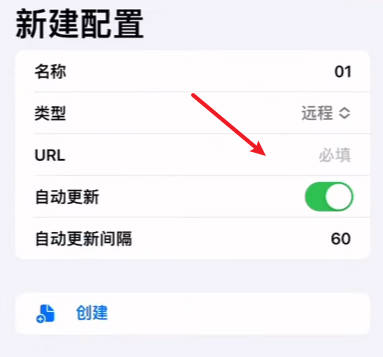
4. Start the Proxy #
Return to the home screen and tap the start button to enable the proxy.
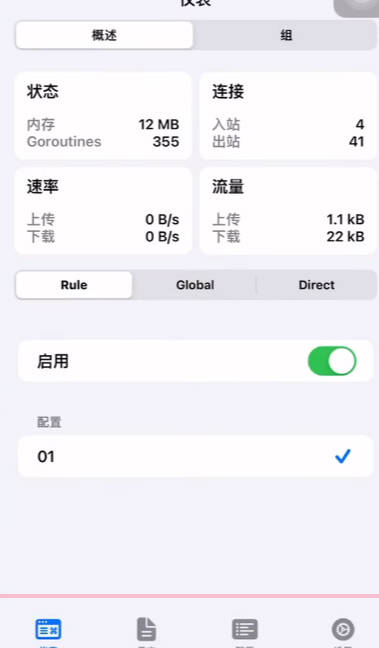
Note: sing-box VT was released on the App Store on September 18, 2024, and the interface is still in English. The screenshots above have been translated into Chinese for easier understanding by Chinese users.
If you prefer a Chinese interface, you can also try other clients such as Stash, Shadowrocket, V2Box or Karing.
Recommended Proxy Services (Airports) #
All services listed below are billed by traffic. After purchase, there is no time limit — use the traffic until it runs out. Each website provides detailed client installation and usage tutorials.
| Name | Price | Traffic | Nodes |
|---|---|---|---|
| Magic Ring (魔戒) | 1 RMB | 1G | 30 |
| Wangji Kuaiche | 7 RMB | 20G | 54 |
| Niubi | 14 RMB | 200G | 31 |
| Flying Rabbit | 30 RMB | 100G | 80 |
| Nongfu Spring | 45 RMB | 200G | 40 |
| Baby Cloud | 55 RMB | 600G | 64 |
| Freedom Cat | 89 RMB | 200G | 71 |
| FS Cloud | 99 RMB | 1000G | 82 |